

Sequence Panel
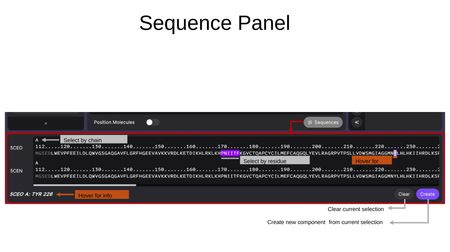
The Sequence Panel is opened by clicking the Sequences button at the bottom-right of the Components Tab. It displays the amino acid sequences of all loaded structures in a horizontal, scrollable view.
Features
- Select by chain — Click the chain letter (e.g., "A") to select an entire chain.
- Select by residue — Click individual residues in the sequence to select them. Selected residues are highlighted.
- Hover for info — Hovering over a residue shows its details (e.g., "5CEO A: TYR 226") at the bottom of the panel.
- Clear — Clear the current selection.
- Create — Create a new component from the current residue selection.
When a component is active in the sequence panel, an Update button appears to update the existing component with the current selection.