

Chemical Interactions
The Chemical Interactions plugin visualizes ligand-receptor and protein-protein interactions. It uses Arpeggio to calculate interactions.
Instructions
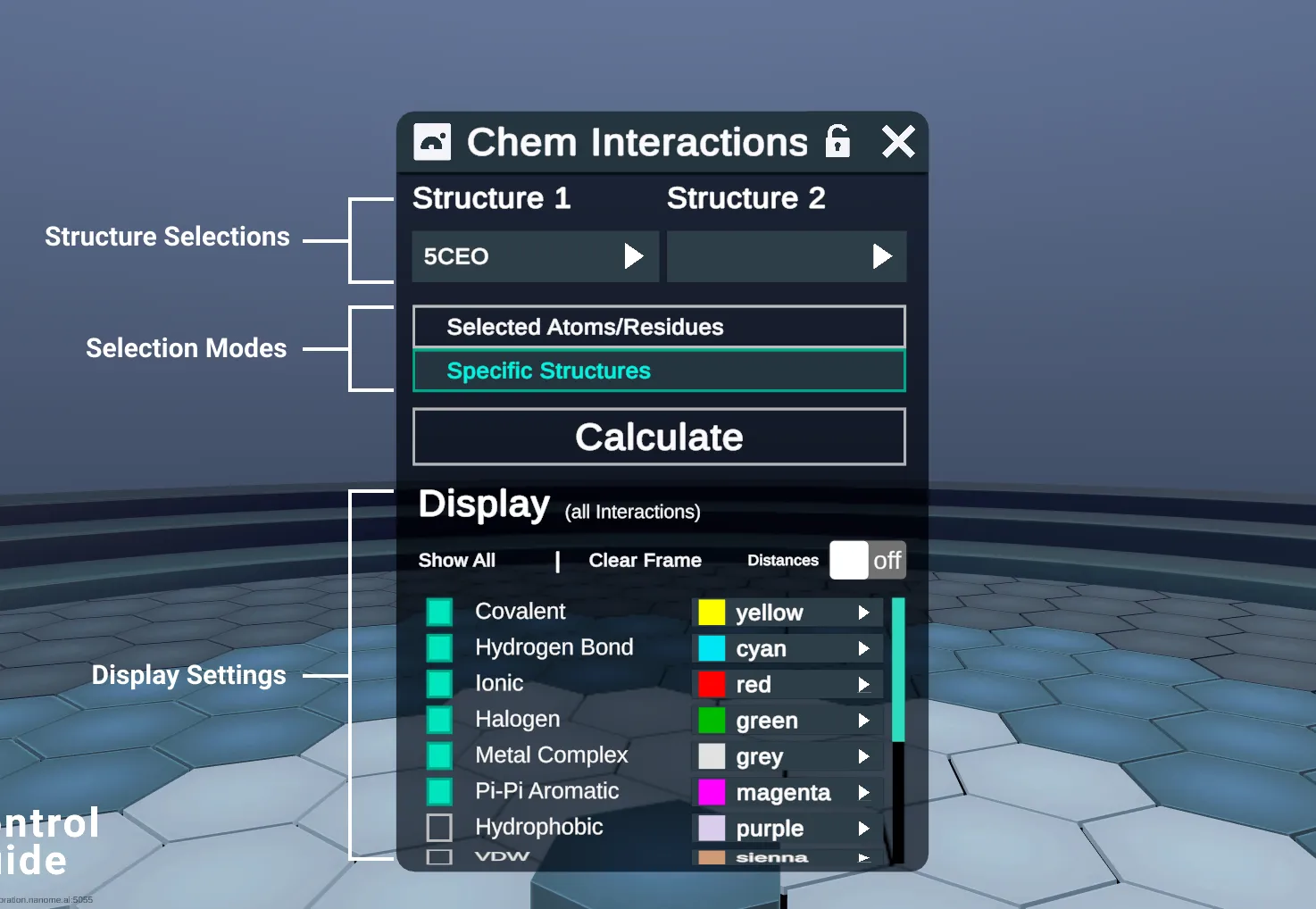
Select Structure 1 from the dropdown. This should be the receptor, or the larger of the 2 interacting proteins.
Set your Selection mode for Structure 2
- Selected Atoms/Residues: Uses the atoms/residues selected in the workspace, and calculates interactions with Structure 1.
- Atoms/residues can be from any complex in the Entry List.
- Does not require the Structure 2 dropdown
- Specific Structures: Select either another complex in the workspace, or a ligand extracted from Structure 1.
- When Structure 1 dropdown is populated, the plugin automatically detects ligands, and adds them to the choices for Structure 2.
- Fewer atoms in the Structure 2 selection means a faster calculation. A full protein-protein calculation can take a long time to render, so narrow the selection as much as you can.
- Selected Atoms/Residues: Uses the atoms/residues selected in the workspace, and calculates interactions with Structure 1.
Press Calculate, which will identify interactions using Arpeggio, and render results in your workspace.
Modify the Display Settings to show or hide interactions of interest.
- Change the visibility or color of each interaction type
- Show All: Shows all interaction types, hides them all, or goes back to the default ones. Its label cycles through Show All, Hide All and Show Default.
- Clear Frame deletes all interaction lines visible in the workspace.
- Distances: labels each visible interaction line with its length in Å.
- The receptor, or the larger of the 2 interacting proteins.
- Another complex, or a ligand found in Structure 1. Used with Specific Structures.
- Selection mode that uses the atoms/residues selected in the workspace.
- Selection mode that uses the Structure 2 dropdown. Picked here.
- Finds the interactions with Arpeggio and draws them in the workspace.
- Shows or hides all interaction types. Its label cycles through Show All, Hide All and Show Default.
- Deletes all interaction lines visible in the workspace.
- Labels each interaction line with its length in Å.
- Shows or hides each interaction type.
- Sets the color of each interaction type.